The Physical Map
The internet isn't a cloud—it's a planet-spanning lattice of fiber, copper, radio waves, and satellites, all orchestrated by routers.
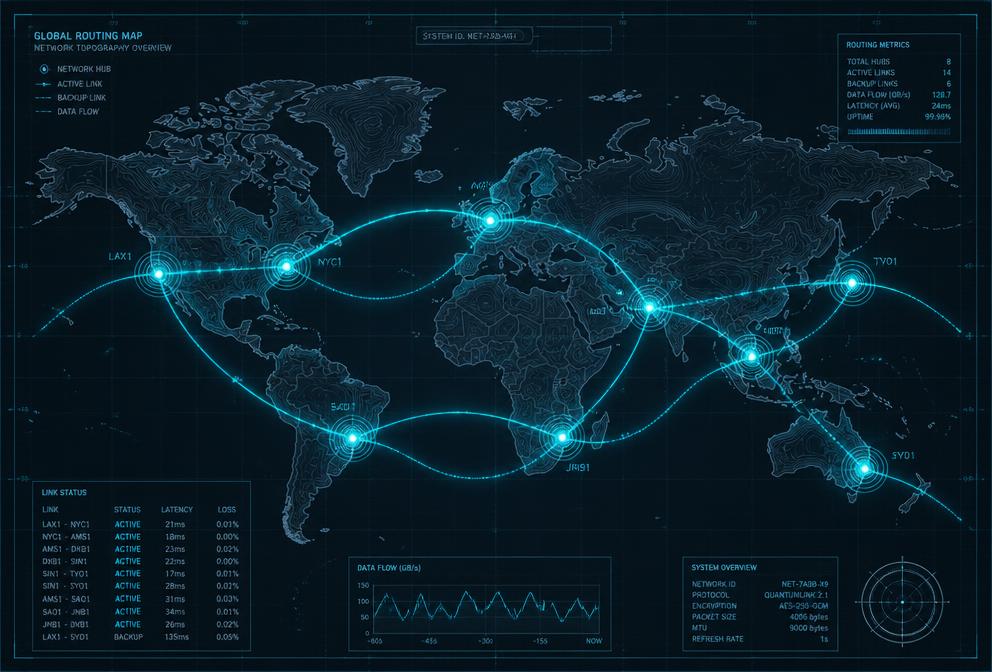
From Your Device to the World
Every click begins a physical journey. A signal leaves your device over Wi-Fi or Ethernet, reaches your local router, travels through your Internet Service Provider's network, and eventually joins the global backbone of high-capacity fiber links.
The Key Pieces
- Routers
- Traffic directors that read packet headers and decide the best next hop toward the destination. They maintain routing tables and exchange updates using protocols like BGP and OSPF.
- Switches
- Local network devices that forward data to specific devices within the same building or data center using MAC addresses.
- Data Centers
- Massive facilities filled with servers that host websites, cloud services, and storage. They are connected to the backbone through multiple redundant links.
- Undersea Cables
- Fiber-optic cables laid across ocean floors carry roughly 99% of international internet traffic. They are thinner than a garden hose but can carry terabits per second.
How Routers Choose a Path
Routers don't know the entire path to a destination. They only know the best next hop. Using routing protocols, they share information with neighboring routers to build a map of network topology. When a link fails, traffic is automatically rerouted around the problem.
Key Term
BGP (Border Gateway Protocol)
The protocol that connects autonomous systems—large networks owned by ISPs, universities, and corporations—into a single global internet.