DNS Resolution
Every website has a name you can remember and an address a machine can find. DNS is the translator between the two.
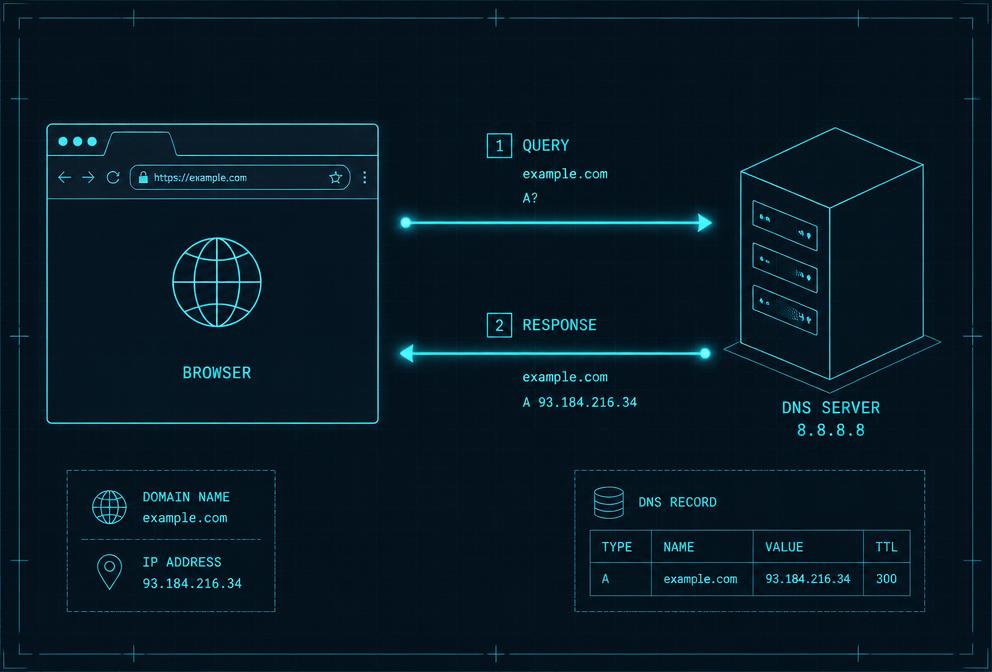
The Internet's Address Book
When you type google.com into your browser, your computer doesn't inherently know where Google lives. It needs a numerical address called an IP address—something like 142.250.80.46.
The Domain Name System (DNS) is a distributed database that maps friendly domain names to these numerical IP addresses. It's hierarchical, like a tree: root servers at the top know where to find top-level domains (.com, .org), which in turn know where to find authoritative servers for specific domains.
How a DNS Query Works
- You ask your browser to visit a website. Your browser first checks its local cache to see if it already knows the IP.
- Your device asks a resolver, usually provided by your ISP or a public service like Cloudflare (1.1.1.1) or Google (8.8.8.8).
- The resolver asks the root DNS servers, which point it to the correct top-level domain server.
- The TLD server points the resolver to the domain's authoritative name server, which holds the actual IP address record.
- The resolver returns the IP to your device, and your browser can finally open a connection.
Key Term
TTL (Time to Live)
A value attached to DNS records that tells resolvers how long they can cache the result before checking again. Lower TTLs allow faster changes; higher TTLs reduce query load.